


Table of contents
- The real question: which docs task goes where
- What “local LLM” actually means for a docs team
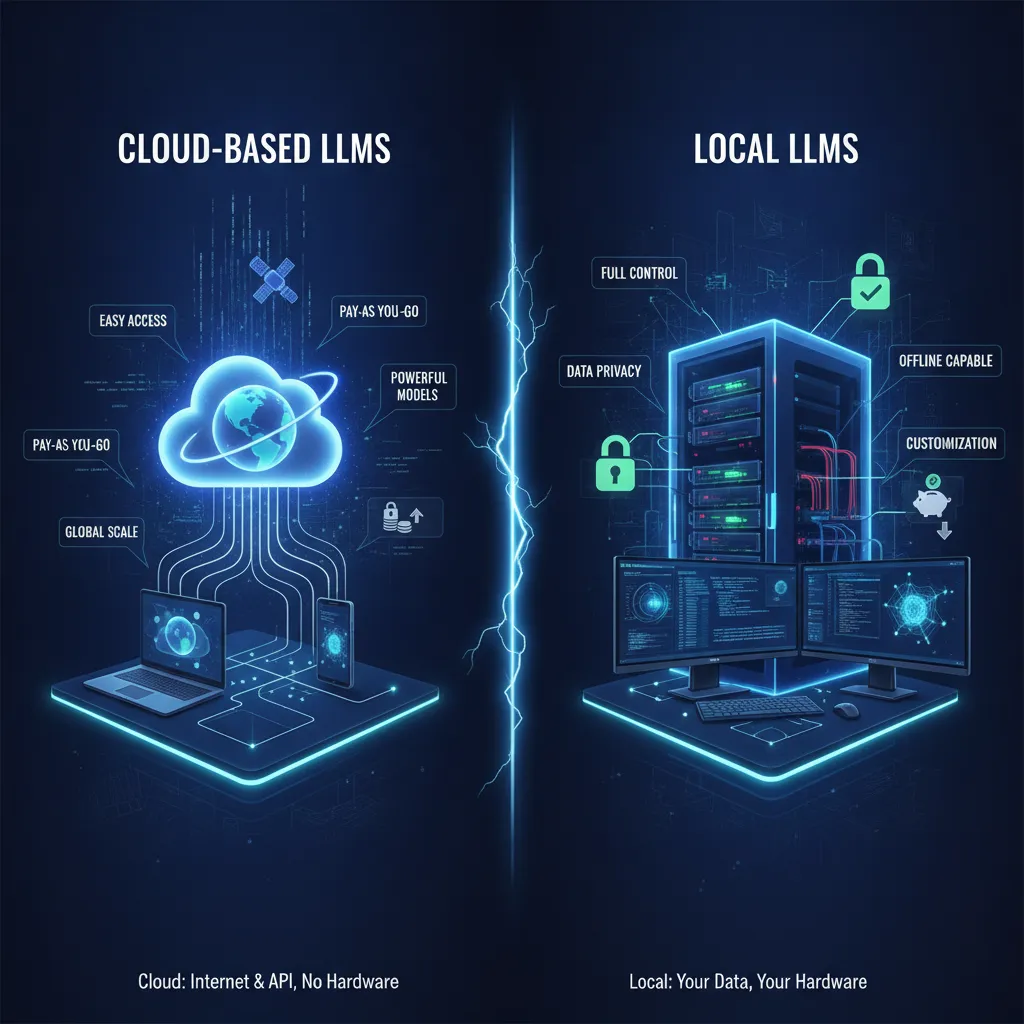
- The five tradeoff axes for local LLM vs cloud-hosted LLM
- Hardware reality check
- Cost worked example for a docs pipeline
- Per-task routing table
- Decision checklist and where this fits the wider docs stack
- Conclusion
- Additional resources
If your documentation pipeline calls an LLM, you have already made the easy decision. The harder one is sitting right behind it: should that model run on your own hardware, or should you keep paying per token to a cloud provider? Most comparisons treat this as a loyalty test between OpenAI and whatever open-weight model won the latest benchmark. That framing is not useful. The honest answer is that it depends on the specific task, the sensitivity of the content, the volume you are pushing through, and the quality bar the output needs to clear. Most teams that think carefully about it end up running both, routing different jobs to different backends, and treating the model as a swappable config rather than a permanent commitment. This post gives you a repeatable way to make that call, grounded in real, installable tooling rather than theoretical architecture diagrams. It builds on the broader case for documentation that works for both human readers and AI systems, without treating these as competing goals.
The real question: which docs task goes where
The framing that actually serves you is not “local or cloud?” but “which task, and why?” A documentation workflow is not a monolith. It contains discrete jobs: drafting reference stubs from code, summarising changelogs, powering a RAG search or Q&A layer over an internal knowledge base, tagging and classifying a document archive, running OCR cleanup on ingested files, linting and rewriting prose. Each job has different sensitivity, volume, latency tolerance, and quality requirements.
Before you even reach the local-vs-cloud question, it is worth asking whether the step needs an LLM at all. The intelligent process automation decision framework is a useful prior step: deciding whether your documentation workflow actually needs an LLM or whether a simpler automation step will do keeps you from over-engineering a solution to a problem a regex and a webhook already solve.
Once you have confirmed you need an LLM, the deployment question becomes the infrastructure decision this post is about.
What “local LLM” actually means for a docs team
Running an LLM locally means the model weights live on your machine and inference happens on your hardware. Nothing is transmitted to a third-party server. The practical stack for this in 2025 is: a runner like Ollama or LM Studio that handles model download, quantization, and serving; an open-weight model such as Llama 3, Mistral, Qwen, or DeepSeek in GGUF format, quantized to fit your available VRAM; and an OpenAI-compatible REST endpoint that the runner exposes so your existing tooling needs no changes to point at a local backend instead of a cloud one.
This is not theoretical or experimental. Three categories of off-the-shelf tools demonstrate what the local path looks like in practice:
- DocuBrowser is a focused local document-search tool. It runs entirely on-device via Ollama (using nomic-embed-text for embeddings and dolphin3 for synopses), requires no internet connection, no accounts, no API keys, and charges nothing per query. It auto-installs Ollama during setup. You get semantic search plus on-demand AI synopses over your document pile, with PII awareness built in.
- Paperless-ngx, a self-hosted document management platform, can be extended with add-ons like Paperless-AI and paperless-gpt. These call a local Ollama model to auto-tag, auto-rename, run OCR cleanup, summarise, and answer RAG questions over your archive, with all processing staying on the box. This is the “keep the platform, bolt on local inference” pattern, and the OpenAI-compatible endpoint is precisely what makes it work: the add-ons were written to call an OpenAI-style API and simply point at your Ollama server instead.
- AnythingLLM and Open WebUI are general-purpose local RAG and chat interfaces. Both are self-hosted. Both can point at a local Ollama or LM Studio backend or at a cloud provider. AnythingLLM is built around private document Q&A with workspaces and citation-backed answers. Open WebUI is chat-first with multi-user support, RBAC, and pipeline hooks. Both let you swap the model backend per workspace without changing anything else.
The point is not to rank these tools. The point is that “run it locally” is a software install, not a research project.
The five tradeoff axes for local LLM vs cloud-hosted LLM
Privacy and compliance
When you send a prompt to a cloud API, that content is transmitted to a provider’s servers, processed under their terms of service, and subject to whatever logging, retention, and jurisdictional rules apply to that provider. For many documentation workflows this is fine. For docs containing unreleased API schemas, internal architecture decisions, customer data, or anything under GDPR, HIPAA, or SOC 2 audit scope, it is a real risk that most small engineering teams have not explicitly modelled.
Local inference removes the data-in-transit vector entirely. DocuBrowser runs with no internet connection at all. Paperless-ngx AI stacks process everything on the box and nothing is uploaded. A real-world example: one engineer running Paperless-ngx with a Mac Mini and Ollama (Llama 3 for chat, nomic-embed-text for indexing) reported that auto-tagging, auto-renaming, and RAG chat over a private archive all work with data never leaving the house.
The caveat is important: local inference removes one compliance risk but does not deliver full HIPAA or GDPR compliance on its own. You still need access controls, audit logging, and data-handling policies. Local is a necessary condition for some compliance postures, not a sufficient one.
Cost shape
Cloud LLM pricing is input/output token billing, with output tokens typically more expensive than input. There is no upfront hardware cost, which makes cloud attractive for low-volume or exploratory work. The cost scales linearly with volume and can surprise you when a batch job runs hot.
Local is the inverse shape: meaningful upfront hardware cost, then essentially zero marginal cost per token. A used mini PC with 16GB RAM can run a classification and tagging stack for a one-time cost in the range of $250-400, compared with a recurring cloud bill that compounds as your document volume grows. For a pipeline that classifies a thousand documents overnight, the local option runs with no rate limits and no per-item charge.
Before buying hardware, exhaust the cloud cost levers: prompt caching, batch processing discounts, and context compression can meaningfully reduce a cloud bill. Hardware is the right answer when those levers still leave you with a cost shape that does not work.
Quality gap
Local open-weight models trail frontier cloud models on hard reasoning, complex synthesis, and tasks that require broad world knowledge. The gap narrows at larger model sizes but does not close. For the common documentation tasks, the practical question is whether the gap matters for your specific job.
For tagging and classification, OCR cleanup, summarisation, changelog distillation, and routine reference drafting, current 7B-13B models are good enough to be genuinely useful. Reviewers running Paperless-AI and paperless-gpt on real document archives report occasional mistags and the need for a quick human review on messy input, but not wholesale failure. The output is usable. For complex explanation writing, nuanced synthesis across multiple sources, or one-off high-stakes drafts where quality is the primary constraint, a frontier cloud model is still the better choice.
Latency and offline operation
Local inference removes the network round-trip. For a user-facing Q&A interface, that latency saving is perceptible. For a batch job running overnight, it is largely irrelevant. The more significant offline advantage is air-gapped operation: AnythingLLM works fully offline once Ollama models are pulled, which matters for networks with restricted egress or compliance environments where outbound connections to cloud providers are not permitted.
Control and lock-in
When you run a local model, the weights and the stack are yours. Provider terms do not change under you. Pricing cannot shift without notice. You can pin a model version and keep it. Cloud gives you managed upgrades, a maintenance-free inference layer, and access to the latest frontier models without running your own hardware, but you are exposed to whatever the provider decides to do next with pricing, model availability, and API terms.
Hardware reality check
VRAM is the binding constraint for local inference. The practical baseline that appears repeatedly in real documentation deployments is a consumer GPU with 12GB VRAM (an RTX 3060 is a common reference point) or an Apple Silicon Mac Mini running Ollama. A 7B-8B model quantized to Q4 fits comfortably in 12-16GB and covers the documentation tasks where local inference is competitive. Setup with Ollama takes minutes, and tools like DocuBrowser auto-install it.
A 7B model is not the ceiling. Larger models run on larger hardware and close the quality gap further. But for tagging, OCR cleanup, summarisation, and RAG search over internal documentation, a 7B-8B Q4 model on modest consumer hardware is the entry point, not a compromise.
Cost worked example for a docs pipeline
RAG-based docs Q&A is input-heavy: you are sending retrieved chunks plus a question and receiving a short answer. Cloud billing splits input and output pricing, with output typically more expensive. If your Q&A workload is high-volume and the input chunks are long (as they often are in technical reference retrieval), the per-query cost accumulates faster than back-of-envelope estimates suggest.
The levers on the cloud side are: prompt caching (amortises repeated context across queries), batch processing (reduces per-token costs for non-latency-sensitive jobs), and context compression (reduces the tokens you send per query). These can change the economics significantly and should be the first thing you model before committing to hardware.
The inflection point toward local is a combination of volume, sensitivity, and batch tolerance. Classifying a thousand documents overnight is a clean case: no rate limits, no per-item cost, no data transmitted off the machine. A single high-stakes architectural explainer written once a quarter is a clean case the other way: the cloud quality advantage is worth the cost and the data sensitivity is manageable.
Per-task routing table
Given the axes above, here is a practical routing guide for common documentation pipeline tasks:
Lean local:
- Bulk tagging, classification, and metadata extraction over a proprietary document archive (DocuBrowser for search and synopses; Paperless-AI/paperless-gpt for tagging, renaming, OCR cleanup)
- Internal knowledge base Q&A where the source documents contain sensitive or unreleased content (AnythingLLM or Open WebUI pointing at a local Ollama backend)
- Overnight batch processing jobs with high document volume and no latency requirement
- Any workflow in a restricted network or air-gapped environment
Lean cloud:
- Complex explanation writing and nuanced synthesis across multiple sources
- One-off high-stakes reference pages where quality is the primary constraint
- Low-volume work where the upfront hardware cost is not justified
The hybrid approach: The better tools in each category make the model a config-level decision, not an architectural one. AnythingLLM and Open WebUI let you point individual workspaces at different backends, so a workspace over sensitive internal docs can use a local model while a workspace for generating public-facing explainers points at a frontier cloud model. The interface does not change. The switch costs nothing to run.
You can also wire this into a documentation MCP server that lets AI agents query your docs at runtime, with the model backend swappable behind the same MCP interface. The OpenAI-compatible endpoint that Ollama exposes is precisely what makes this seamless: tools written to call a cloud API need no changes to call a local one.
Decision checklist and where this fits the wider docs stack
Run through these questions per task before routing it:
- Does the content include unreleased API surface, internal architecture decisions, customer data, or anything under a compliance regime? If yes, default to local.
- Is this a high-volume batch job where per-token cost compounds? Model both shapes and check whether cloud cost levers (caching, batching, compression) close the gap before buying hardware.
- Does the task require complex multi-source reasoning, nuanced synthesis, or a quality bar that current 7B-13B models do not clear? If yes, route to cloud.
- Does the workflow need to operate offline or in an air-gapped environment? If yes, local is required.
- Can the tool you are using swap the model backend per workspace? If yes, run a hybrid split without rebuilding anything.
A few connections worth making explicit as you build out the wider stack:
- If you are generating documentation content with an LLM, local or cloud, the SEO and trust risks of shipping that output without human review are real. The risks of relying solely on AI-generated content are worth reading before you scale any generation pipeline.
- If you are generating prose, local or cloud, a Vale merge gate that enforces prose standards before LLM-generated drafts reach production is the human-defined quality control layer that should sit downstream of any LLM writing assistant.
- The content your LLM is indexing, summarising, or generating into should be structured. Unstructured LLM output degrades faster than Diataxis-structured content. Structuring the content your LLM is generating or summarising into tutorials, reference, how-to guides, and explanation is the organisational layer that makes generated content maintainable.
- For teams whose documentation is publicly accessible, an llms.txt file that signals to AI systems which parts of your documentation to prioritise is the discovery layer relevant when externally hosted models read your public docs.
Conclusion
The local LLM vs cloud-hosted LLM decision for documentation workflows is not a permanent architectural stance. It is a per-task routing question with five stable axes: privacy, cost shape, quality tolerance, latency and offline needs, and control. For most docs teams, the right answer is a hybrid setup, using local models for sensitive, high-volume, or offline work and cloud models for complex reasoning and high-stakes drafts. The tools to run this hybrid already exist, are installable today, and make the model a config variable rather than a rebuild trigger. Start with the task, work through the axes, and let the answer follow. The model landscape will keep shifting, but those tradeoffs will not.
Ready to audit your documentation pipeline and work out which tasks belong where? Book a consult or get in touch to talk through the specific jobs your workflow is running and what the right infrastructure looks like for your team.
Additional resources
- DocuBrowser on GitHub — open-source local document search with on-device semantic search and AI synopses via Ollama, no API keys required.
- Running LLMs locally with Ollama and llama.cpp: a developer’s guide — practical introduction to the local inference stack, covering GGUF, quantization, hardware requirements, and the OpenAI-compatible API.
- Techno Tim: Self-hosted Paperless-ngx with optional local AI — walkthrough of extending Paperless-ngx with Ollama-backed AI add-ons for tagging, OCR, and document Q&A.
- AnythingLLM setup guide with Ollama — step-by-step guide to standing up a private, fully offline RAG and document Q&A stack.
- LLM API pricing comparison 2026 — current cloud pricing breakdown with input/output split, useful for modelling when volume tips the economics toward local.
References
- GitHub - linuxrebel/DocuBrowser: A local AI powered Document search engine
- Local LLM vs Cloud API: When to Use Each (2026 Trade-offs)
- LLM API Pricing Comparison In 2026
- Cloud LLM vs Local LLMs: Examples & Benefits
- Local LLMs vs Cloud LLMs in 2026: Privacy, Speed & Cost Compared
- Turning a pile of documents into a searchable usable knowledge base (Hacker News)
- Self-Hosted Paperless-ngx + Optional Local AI: Private Documents and Improves OCR & Search (Full Setup) | Techno Tim
- Paperless-ngx with Local AI — Rob McBryde
- I use local LLMs and self-hosted apps to manage my documents instead of relying on ChatGPT
- Paperless-ngx paired with a local LLM has made managing my documents so much easier
- Running LLMs Locally with Ollama and llama.cpp: A Developer's Guide
- Updating paperless-ngx document titles with LLMs - Corentin Perret-Gentil
- I use my local LLMs with this self-hosted tool to manage documents in Paperless-ngx
- https://www.datacamp.com/blog/anythingllm
- AnythingLLM vs Open WebUI (2026): Best Local RAG App?
- Set Up AnythingLLM with Ollama: Local RAG Guide (2026)
- I use local LLMs and self-hosted apps to manage my documents (privacy tradeoff)
- Self-Host Paperless-ngx With Local AI — Private Documents, Better Search, Zero Cloud