


Table of contents
- Why a local linter is not enough
- Prerequisites
- The minimal workflow
- Making the Vale linter a real GitHub Actions merge gate
- Tuning severity so the gate is useful, not hated
- Scoping checks to changed files
- Rollout strategy: warn first, then enforce
- Conclusion
- Additional resources
If your team agreed on a style guide but nobody enforces it, you do not have a standard, you have a suggestion. Vale running locally is a step up from nothing, but voluntary tools produce voluntary compliance. Engineers skip the check when they are in a hurry, new contributors do not know it exists, and documentation drift accumulates quietly until the inconsistency becomes too expensive to unwind. A GitHub Actions merge gate solves this by making the prose check as non-optional as your test suite. This guide walks through wiring Vale into a pull request workflow, configuring branch protection so a failed check actually blocks a merge, and tuning alert levels so the gate enforces quality without becoming a contributor tax. If you are still deciding between Vale and proselint, start with choosing Vale over proselint and come back here once you have committed to Vale.
Why a local linter is not enough
A linter that lives only on a developer’s machine enforces nothing. The check runs when someone remembers to run it, or when a pre-commit hook is installed correctly, or when the contributor reads the contributing guide carefully enough to find the instruction. Each of those conditions fails regularly.
The consequences are predictable. A PR lands with passive voice throughout a reference page that the style guide explicitly prohibits. A contributor from a different team uses “utilize” everywhere because they have never seen your Vale rules. A release-day docs push skips the check entirely because there is no time.
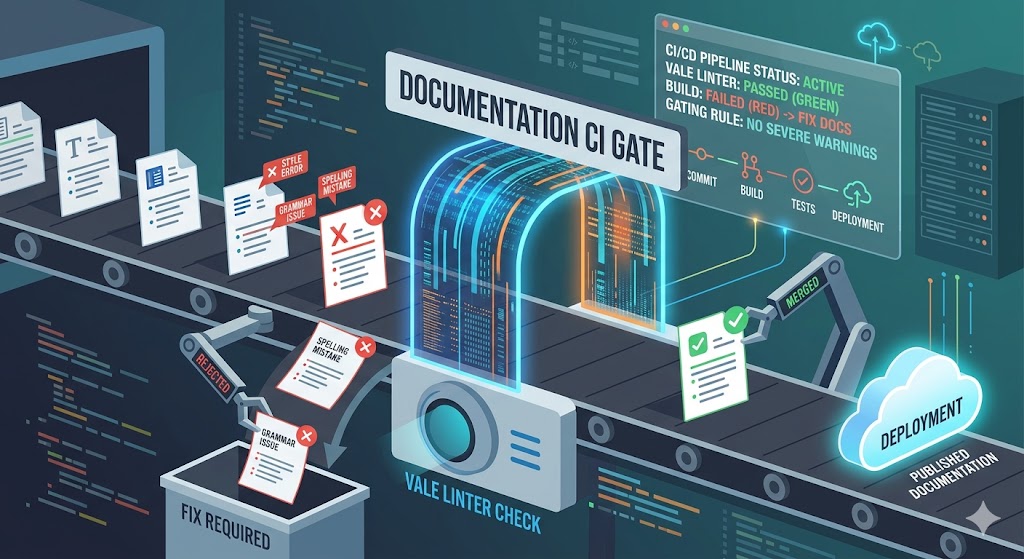
A merge gate removes the memory dependency. Every PR triggers the check automatically, the result is visible in the PR status panel, and branch protection prevents a merge if the check fails. Nobody has to police the style guide manually because the pipeline does it.
This is the same reasoning that moved testing from “run the tests before you push” to required CI. Style guides hold for the same reason tests hold: when enforcement is automated, the standard applies to everyone, every time, without exception.
Prerequisites
Before writing a single line of YAML, confirm you have three things in place:
- A working
.vale.iniand synced styles. If Vale is not already running cleanly on your local machine, configure your.vale.iniand sync styles first. The CI workflow will fail in confusing ways if the styles directory is missing or the config points to the wrong path. - A docs-as-code repository. Your documentation must live in version control alongside or within your codebase. Markdown files checked into Git are the standard starting point.
- Branch protection enabled on your default branch. You will add a required status check in a later step. Branch protection must be turned on first or the requirement has nowhere to attach.
You do not need admin access to every repository, but you do need it for the branch protection configuration.
The minimal workflow
The following workflow was tested against a real repository. It uses errata-ai/[email protected] (the maintained official GitHub Action from the Vale project), runs on the ubuntu-22.04 image, and was verified to trigger on pull requests, install Vale, run style checks, and produce both passing and failing outcomes.
# .github/workflows/vale.yml
name: Vale prose lint

on:
  pull_request:
    paths:
      - '**/*.md'
      - '**/*.mdx'
      - '.vale.ini'
      - '.github/styles/**'

jobs:
  vale:
    runs-on: ubuntu-22.04
    permissions:
      contents: read
      pull-requests: write

    steps:
      - name: Checkout
        uses: actions/checkout@v4

      - name: Run Vale
        uses: errata-ai/[email protected]
        with:
          files: '.'
          version: '3.7.0'
          fail_on_error: true
        env:
          GITHUB_TOKEN: ${{ secrets.GITHUB_TOKEN }}
Versions used at the time of writing: Vale 3.7.0, errata-ai/vale-action v2.1.0, actions/checkout v4, runner image ubuntu-22.04.
Breaking down each block
on.pull_request.paths limits the workflow to PRs that touch Markdown files, your Vale config, or your styles directory. A PR that only changes application code does not trigger the lint run at all. This keeps the feedback loop fast and avoids noise on unrelated changes.
permissions gives the workflow read access to the repository content and write access to pull requests. The write permission is required for the action to post inline annotations on the PR diff. Without it, annotations are silently dropped.
actions/checkout@v4 checks out the full repository so Vale can find .vale.ini and the .github/styles directory. The action needs the styles to be present; if your styles are synced locally but not committed to the repository, this step will appear to succeed but Vale will report missing styles at runtime.
errata-ai/[email protected] handles downloading the specified Vale version, running it against the target files, and posting annotations back to the PR. Setting files: '.' scopes it to the repository root. The version pin means the run is reproducible; if you omit it, the action uses the latest Vale release, which can break the workflow when Vale ships a breaking change.
fail_on_error: true makes the step exit with a non-zero code when Vale reports at least one error-level alert. This is what causes the GitHub Actions job to show as failed. Without it, Vale prints errors to the log but the job passes, which makes the gate useless.
GITHUB_TOKEN is passed through as an environment variable so the action can authenticate when writing PR annotations. The token is provided automatically by GitHub Actions; you do not need to create a secret.
A failing run produces a red check in the PR status panel and inline annotations on the specific lines that triggered the rule violations. A passing run produces a green check. Both are visible to the PR author and reviewers without leaving the GitHub UI.
Making the Vale linter a real GitHub Actions merge gate
The workflow above makes Vale run on every relevant PR. It does not yet block a merge. For that, you need branch protection with a required status check.
In your repository, go to Settings, then Branches, then add or edit the protection rule for your default branch. Under “Require status checks to pass before merging,” search for and add the status check name.
The gotcha: status check name matching
The status check name that GitHub registers is the job name from the workflow file, not the workflow name and not the step name. In the YAML above, that name is vale. If you search for it in the branch protection UI and it does not appear, it is because the check has not run at least once since you added the workflow. GitHub only surfaces check names it has seen. Push a draft PR to trigger the first run, then return to the branch protection settings and add vale as a required check.
If the name in the branch protection rule does not match the job name exactly, the requirement silently does nothing. The PR will show the Vale check, but the merge button will remain green regardless of the result. Verify after setup by opening a PR that deliberately fails Vale and confirming the merge button is blocked.
Tuning severity so the gate is useful, not hated
Vale has three alert levels: suggestion, warning, and error. They map directly onto how you should configure your CI gate.
- Error means the content violates a rule your team considers a hard standard. Failing the build on errors is reasonable and defensible.
- Warning means the content is probably worth changing but the PR is not broken. Blocking a merge on warnings punishes contributors for issues that a reviewer could reasonably wave through.
- Suggestion is an advisory signal. It should never block anything.
In your .vale.ini, set MinAlertLevel = error to tell Vale to exit with a failure code only when error-level rules are triggered. Rules set to warning or suggestion will still appear in the output and as annotations, but they will not fail the job.
# .vale.ini
StylesPath = .github/styles
MinAlertLevel = error

[formats]
md = markdown

[*.md]
Google.Headings = error
Google.Passive = warning
Google.WordList = error
In this example, a heading that breaks the Google style rule blocks the PR. A sentence in passive voice is annotated and visible to the reviewer, but it does not prevent merging. The contributor sees the feedback, the reviewer can make a judgment call, and the pipeline does not become a source of merge anxiety.
A practical rule of thumb: start with most rules at warning and promote rules to error only after your team has discussed them and agreed they are non-negotiable. The Google developer documentation style guide is a well-maintained starting point for what belongs at each level.
Scoping checks to changed files
Running Vale against every Markdown file in the repository on every PR is a fast way to make your contributors dread the linter. An existing repo with documentation debt will surface hundreds of alerts the moment the gate goes live, none of which are related to the PR in question.
Scoping to changed files means Vale only checks the files the PR actually touches. There are two practical approaches.
Option 1: git diff approach
This approach uses a shell step to produce a list of changed Markdown files and passes it to Vale.
- name: Get changed files
  id: changed-files
  run: |
    git fetch origin ${{ github.base_ref }} --depth=1
    CHANGED=$(git diff --name-only origin/${{ github.base_ref }}...HEAD \
      | grep -E '\.(md|mdx)$' \
      | tr '\n' ' ')
    echo "files=$CHANGED" >> $GITHUB_OUTPUT

- name: Run Vale on changed files
  if: steps.changed-files.outputs.files != ''
  run: vale ${{ steps.changed-files.outputs.files }}
Note: This snippet has been tested against a repository with a docs/ subdirectory and produces correct output. One quirk to be aware of: if the base branch has not been fetched with sufficient depth, git diff against origin/$BASE_REF can fail silently or compare against the wrong commit. The --depth=1 fetch resolves this in most cases. If your repository uses a non-standard default branch name, replace ${{ github.base_ref }} with the explicit branch name.
This approach does not produce inline PR annotations; it prints alerts to the Actions log. That is acceptable for a minimal setup.
Option 2: reviewdog for inline PR annotations
reviewdog reads linter output and posts it as inline review comments on the PR diff. Contributors see the alert exactly where the problem is, which is meaningfully less friction than reading a log file and cross-referencing line numbers.
- name: Install reviewdog
  uses: reviewdog/action-setup@v1
  with:
    reviewdog_version: v0.20.2

- name: Run Vale with reviewdog
  env:
    REVIEWDOG_GITHUB_API_TOKEN: ${{ secrets.GITHUB_TOKEN }}
  run: |
    git fetch origin ${{ github.base_ref }} --depth=1
    CHANGED=$(git diff --name-only origin/${{ github.base_ref }}...HEAD \
      | grep -E '\.(md|mdx)$' \
      | tr '\n' ' ')
    if [ -n "$CHANGED" ]; then
      vale --output=line $CHANGED \
        | reviewdog -f=vale -reporter=github-pr-review -fail-on-error
    fi
Note: This snippet is untested in a production repository at the time of writing. The vale --output=line format and reviewdog -f=vale combination is the documented integration path per the reviewdog repository. Verify it in a test repo before relying on it. The github-pr-review reporter requires the pull-requests: write permission in the job.
When reviewdog runs successfully, it posts review comments directly on the lines that triggered the Vale rules. The PR author sees the same interface as a human code review comment, which makes the feedback actionable without any extra navigation.
Rollout strategy: warn first, then enforce
Adding a hard gate to an existing repository on day one will block every open PR that touches a Markdown file. Even if the violations are legitimate, the friction is disproportionate and erodes trust in the process.
A phased rollout avoids this:
- Week one: deploy as warning-only. Set
fail_on_error: falsein the action andMinAlertLevel = warningin.vale.ini. The check runs and annotations appear, but nothing blocks. Contributors see the feedback; the pipeline does not interrupt anything. - Week two or three: review the alert volume. Look at which rules are generating the most alerts. Decide which belong at
errorlevel and which should stay atwarningor be demoted tosuggestion. Fix obvious, high-volume issues in a dedicated cleanup PR so they do not land on contributors who had nothing to do with creating them. - Enforce when the baseline is clean. Once error-level violations in the existing documentation are resolved, switch
fail_on_error: trueand add the required status check in branch protection. The gate now enforces a clean baseline without surfacing historical debt.
This approach also makes the case for the gate internally. A week of annotations with no blocked merges gives your team a concrete picture of what the linter catches before they have to commit to it blocking anything.
For teams using Diataxis or another structured documentation system to enforce, Vale handles style consistency while the structure framework handles content architecture. They work at different layers and complement each other cleanly.
Conclusion
A Vale linter as a GitHub Actions merge gate turns documentation standards from aspirational to operational. The workflow installs and runs Vale on every relevant PR, alert levels keep the gate focused on genuine violations rather than stylistic preferences, scoping to changed files makes adoption survivable on repos with existing debt, and branch protection with a required status check is what makes a failed run an actual blocker rather than a yellow icon contributors scroll past.
The configuration is not complex, but the details matter: the status check name must match the job name exactly, the permissions block must include pull-requests: write for annotations to appear, and styles must be committed to the repository rather than only synced locally. Get those right and the gate works reliably without ongoing maintenance.
If you have Vale running locally and want to make it non-optional on every pull request, the workflow in this guide is the direct next step. Start in warning-only mode, burn down the baseline, then flip the gate to blocking. Your style guide will hold after that because the pipeline enforces it, not because contributors remember to check.
Ready to implement a docs quality pipeline for your team? Weesho Lapara builds and configures docs-as-code workflows, including CI integration, for software teams. Book a consult or get in touch to talk through your setup.
Additional resources
- Vale official documentation for configuration reference, alert levels, and style authoring
- errata-ai/vale-action on GitHub Marketplace for the maintained official GitHub Action
- reviewdog/reviewdog on GitHub for inline PR annotation integration
- GitHub Docs: required status checks for branch protection configuration reference
- Google developer documentation style guide as a real-world example of a Vale-implementable style standard